Rival intelligence
Manager profiles and draft tendencies
Projections tell you what a player is worth. A manager's profile tells you what the person picking ahead of you is going to do about it. Once you have imported your league's history, RotoAlpha builds a scouting report on every manager in it.
This is free. It does not need the season pass.
Where to find it
Open Managers under All-Time in the left sidebar. The page opens on Profiles, and the rail across the top reads the same underlying data from opposite directions:
- Pick a name from the rail to study one manager in depth.
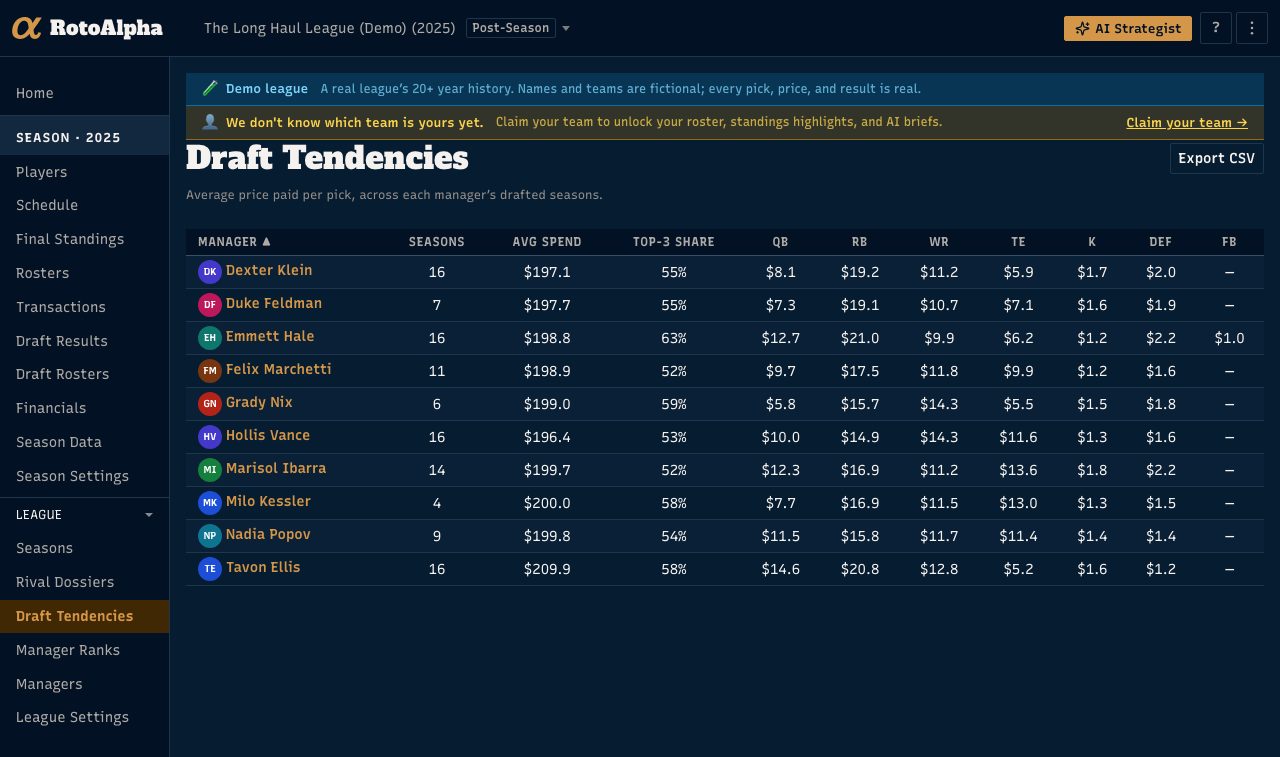
- Pick Compare all for the draft tendencies table: every manager at once, one row each, sortable. This is the "who does this most" view. It opens on this season's managers, the people you actually draft against; switch it to All managers to include everyone who has ever held a seat.
Reach for a profile when you are studying one rival, and the tendencies table when you want to know where somebody ranks against the room. Manager names in the table link straight into their profiles.
What is in a profile
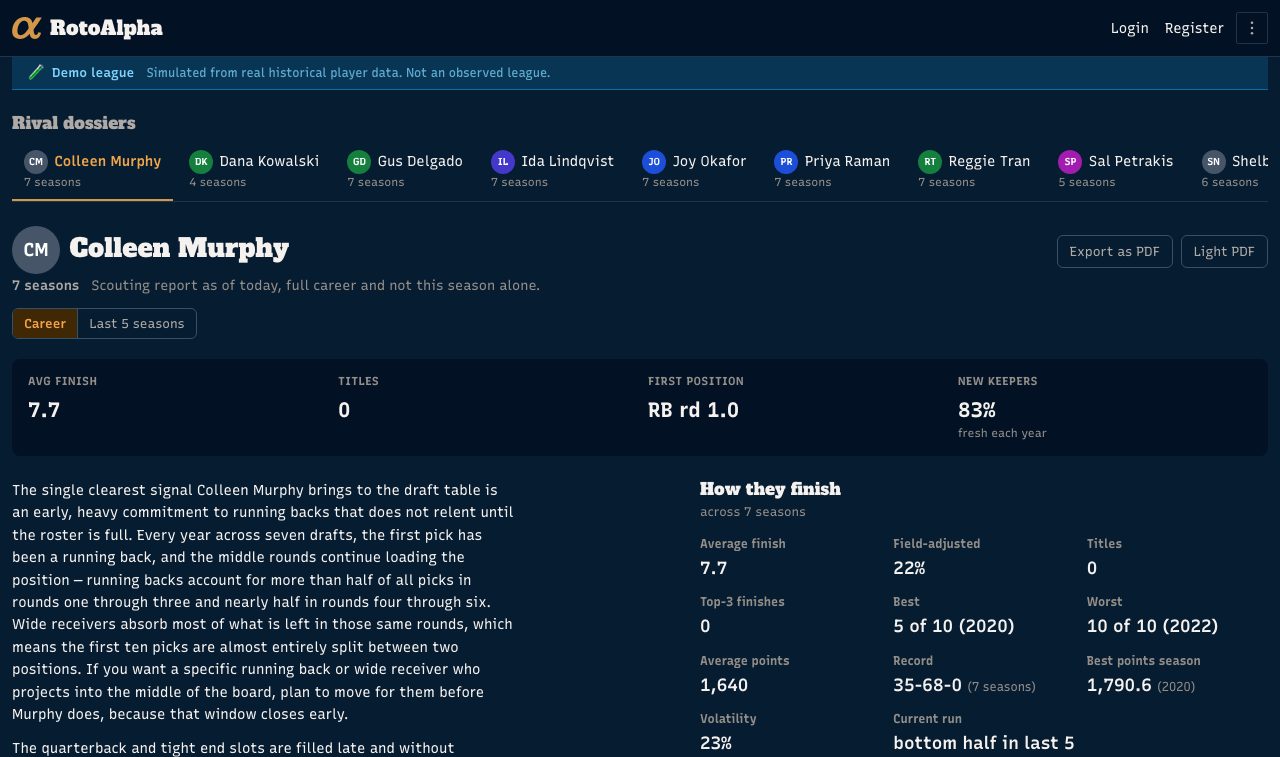
The top of the page is the summary: average finish, top-3 finishes, average points, best season. Below that, the sections that make it a scouting report rather than a record book:
- Where their money or their picks go. Share of spend by position in an auction league, typical first pick at each position in a snake league, both measured against your league's own market rather than a national average.
- Draft slot history, average and earliest.
- Favorite players: who they take again and again.
- Team and college affinity: the real-life franchises and programs that keep showing up in their picks.
- Stacking: how often they draft a quarterback and a pass-catcher from the same real team.
- Rookies: how much of their draft goes to first-year players.
- Keepers: how many they hold, for how long, and at which positions.
- Roster churn: how much of what they drafted was still on their roster at the end of the season.
- Budget usage in an auction league: how much of each season's budget they actually spend at the draft, and how much they leave on the table.
A profile always describes a manager's whole career as of today. It is not sliced to the season you happen to be viewing. The season you have selected decides only which seats appear in the rail.
How sure it is, and how it says so
A single season is not a tendency. RotoAlpha grades every signal by how many seasons back it and changes its language to match:
| Seasons of history | How it is stated |
|---|---|
| 1 | As a fact about that one draft, never as a pattern |
| 2 to 3 | "Tends to", "usually" |
| 4 or more | Strong language such as "every year" is supportable |
Each section is graded on its own count, so the same manager can be firmly established on finishes and thin on keepers at the same time, and the page will say so in each place rather than averaging the honesty out.
Below two seasons there is no written summary at all. The numbers still render; prose that would have to hedge every sentence does not.
The written summary
Where there is enough history, the profile carries a written scouting report above the numbers. The numbers stay visible underneath it, deliberately: if the prose ever drifts from what the data says, you can see it rather than take our word for it. When history changes, the page tells you the summary is being rewritten and that the numbers below are already current.
Export as PDF at the top of the page gives you something to print or bring to the draft.
Your own marks
The profile's third layer is what you have noticed. Add a mark to a manager, and every time the page loads RotoAlpha judges it fresh against the current numbers. A mark the history backs up shows the number that backs it up. One the history contradicts is flagged as worth a second look. One the data cannot speak to stays your own observation, with its age shown.
Marks are private. They are never shown on public pages, and they are never fed to the AI.
What if the numbers look wrong
Nearly always it is an identity problem: the same person imported under two spellings, so their history is split in half. Switch to the Names & identity tab at the top of the page to merge, split, rename, or claim managers. Repairing identities is free, and it is the fastest way to fix a report that looks thin.
See one before you have history of your own
The example profile is a real one, built from a real league's imported history, with the names changed.